Here’s a quick fix if you’re interested in installing a VM running Ubuntu Server in Sun‘s OSS virtualization tool, VirtualBox.
After installing the 32bit version of Ubuntu Server 8.10 in VirtualBox 2.0.4 on my MacBook Pro (OSX), I was faced with the following error message when starting the VM, which I found also happens on other platforms:

From Wikipedia:
Physical Address Extension (PAE) refers to a feature of x86 and x86-64 processors that allows more than 4 gigabytes (GB) of physical memory to be used in 32-bit systems, given appropriate operating system support.
Fortunately, the fix was as easy as pie:
- Once VirtualBox is up and running, select your Ubuntu Server VM.
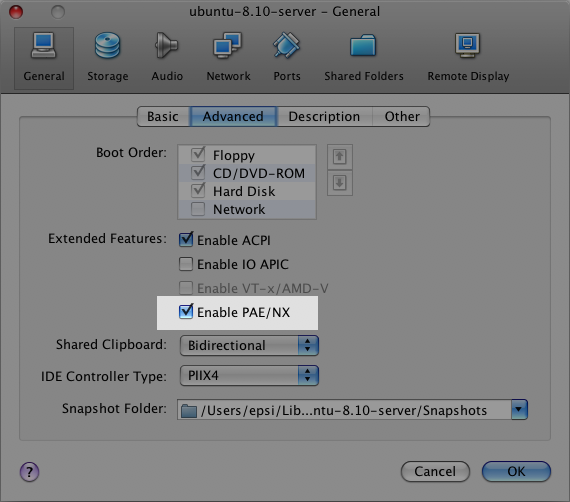
- Go to the “General” configuration screen and select the “Advanced” tab.
- Check the “Enable PAE/NX” option.
Here’s a screenshot:
Try starting your VM again, and all should go as planned. It did for me.