Tag: mobile

  • Making Ubuntu Server Work in Sun's VirtualBox

    Here’s a quick fix if you’re interested in installing a VM running Ubuntu Server in Sun‘s OSS virtualization tool, VirtualBox.

    After installing the 32bit version of Ubuntu Server 8.10 in VirtualBox 2.0.4 on my MacBook Pro (OSX), I was faced with the following error message when starting the VM, which I found also happens on other platforms:

    This kernel requires the following features not present on the CPU: pae

    From Wikipedia:

    Physical Address Extension (PAE) refers to a feature of x86 and x86-64 processors that allows more than 4 gigabytes (GB) of physical memory to be used in 32-bit systems, given appropriate operating system support.

    Fortunately, the fix was as easy as pie:

    • Once VirtualBox is up and running, select your Ubuntu Server VM.
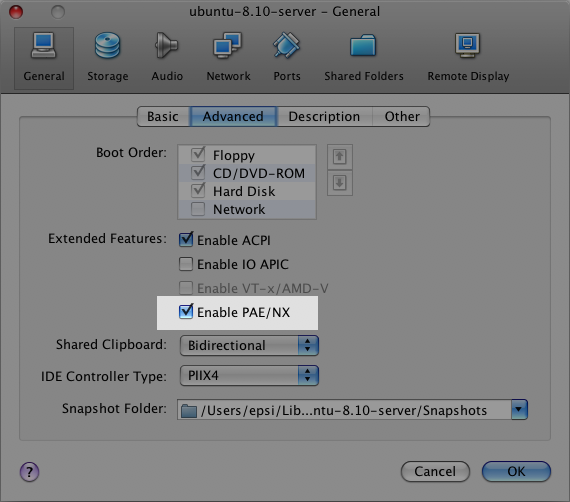
    • Go to the “General” configuration screen and select the “Advanced” tab.
    • Check the “Enable PAE/NX” option.

    Here’s a screenshot:

    Ubuntu Server in VirtualBox: PAE/NX option selection

    Try starting your VM again, and all should go as planned. It did for me.

  • Rogers Canada Wireless Data Plan Update: Good vs. Bad

    It’s no secret that I have one of the infamous 1.3 million missing iPhones with me, here in Montreal.

    I only recently activated the phone features though, then found out that it took special (though widly published) credentials to be able to use Rogers’ EDGE network from the device.

    So I tried the latter a few days ago, and got somewhat of a nasty surprise after trying to load one (yes, only one) Facebook page through Mobile Safari: it ended up costing me around $8.00… Ooops, I guess I won’t be doing that under my pay-as-you-go account…

    I did find this a bit dishonest puzzling, since the same account (and SIM) allowed me to browse the mobile web for $0.05 per page from my older Motorola phone. Of course, there’s a difference between quasi-text-only pages vs. a standard page and all the attached media elements, but still…

    The obvious conclusion was that I’d wait to use EDGE until I could score a decent data plan, since gaining the voice and SMS features was really what I was looking for when unlocking my device.

    Looking for signs of such a plan, I found out that Rogers in fact recently released an unlimited data plan, without much fanfare, now matching Bell Canada’s $7.00/month offering. Details are very scarce and I’m not entirely sure this truly applies to my needs or if some types of weird partnership-based limitations are involved, but it’s definitely worth looking into. Unfortunately, the plan excludes anything but what Rogers wants to peddle, which still makes Bell’s offer a much better choice, but is unfortunately incompatible with the iPhone GSM capabilities (vs. CDMA)…

    Now to top it all off, here is what happened to me this morning and what every iPhone-totting Canadian must be aware of: I was waiting for the bus, browsing the web from my iPhone while connected to a public hotspot (hence why I’m not really in a rush to get EDGE browsing activated). Reception wasn’t great though, being a bit far from the source, and what ensued led me to find out that Rogers has indeed tweaked/opened their network for increased and simplified data access: even though I had cleared out the credentials previously required to access the web through EDGE, it turns out that my iPhone did switch from wifi to EDGE in the middle of my session.

    Of course, the reason I realized the latter fact was that my account quickly went from $7.00 left to $0.00… So unless you do have a ([un]limited) data plan, be very careful if you run an unlocked iPhone in Canada: the usual trick to disable EDGE (ie: not entering the special credentials) will not work anymore, and you might end up with a pretty bad surprise on your bill. Turning off Data Roaming (Settings -> General -> Network -> Data Roaming = off) won’t help either, since Rogers is my carrier. Just be sure that Mail.app doesn’t automatically checks for new messages (Settings -> Mail -> Auto-Check = manual), and avoid using network-based apps unless you have a good wifi connection.

    We’re getting We’ll hopefully get there… At a somewhat totally depressing rate, given countries like Iran and Estonia have better data rates and networks than we do…

  • TUAW's 1.1.3 iPhone Update Liveblog

    From: “1.1.3 iPhone Update Liveblog“:

    It’s time to kiss my beautiful jailbreaked iPhone goodbye and to surrender to the inevitability of the 1.1.3 update. Goodbye delightful shell access. Goodbye beautiful 3rd party applications. I’m upgrading for the sake of my readers–and hopefully downgrading soon after! Read on for the liveblog…

    I salute you, Erica, for taking a bullet for the team once more. 🙂

  • OpenMoko Back on the Horizon

    From “User-modifiable Linux phone upgraded“:

    Open source phone company OpenMoko will ship a new version of its user-modifiable Linux-based mobile phone next year. The “Neo FreeRunner” resembles OpenMoko’s original Neo1973 model, but with WiFi, 3D accelerometers, and a faster processor, as well as a consumer market focus, according to the company.

    OpenMoko (com, org) had kind of fallen off the map after not meeting their October 2007 deadline for launching the consumer version. Gladly, they now seem to be back on track with their newly announced FreeRunner, a Samsung 500MHz SoC-based device.

    I did win an iPhone in the meantime, but I still love OpenMoko. Even though Android and Nokia are now arguably also riding on the Open tagline.

    Via Digg.

    Update: Ouch… It’s supposedly priced at US$600… Hopefully, they’ll get enough volume to lower prices with the new consumer market focus.

  • Sandy Pentland's Reality Mining

    From “Technology Review: What Your Phone Knows About You“:

    Sifting through cell-phone data to get at the truth of people’s social interactions falls under the umbrella of an emerging field that Pentland has dubbed “reality mining.” And he thinks that social networks are just the beginning. The same techniques can be applied to other sets of cell-phone data to help people communicate more effectively, manage their time better, and even make their neighborhoods more livable. And it’s all thanks to the ubiquity of cell phones–the ultimate data-collection machines.

    Via ReadWriteWeb.

  • Filling Up the Break

    I’ll be focusing on Plank until the holidays, but I’m already finding myself filling up my wish list for what I want to tackle during the break. Family first, but there’s always a few hours of the day (err, night) to geek it out.

    So far, here’s what I have down. Posting it here will give me a push to get it done. 🙂

    • New features for WPhone: Viper007Bond, Doug and I are in planning stage for a few nice features we’re trying to deck the upcoming 1.5 version with.
    • Setting myself up with an OpenLDAP sandbox for wpDirAuth: when I left McGill, I also left behind the AD install that was providing me with a testbed for my WordPress/LDAP authentication plugin. I don’t mind flying blind with the code, but it’ll help with support.
    • Write an app with Symfony: I have a small toy project I want to get to, and I’m planning on using this PHP5 framework as a RAD environment.
    • And a few floaters that I haven’t quite officially added to the list yet, like upgrading my site’s theme visually and with data portability in mind, etc.

    Bah, with three kids, it’s not like it was going to be a relaxing vacation anyway.
    Might as well just add to the fun. 😉

  • Fresh Screenshots of WPhone on iPhone

    From iPhone Screenshot Goodness at WPhone Admin Plugin:

    Thanks to Matt, I can now take iPhone screenshots to my heart’s content. So I’ve updated the set showcased on this site and made a zip archive of 18 screenshots available on the same page.

    The only sad thing about this is the “No Service” at the top-left corner of each screenshot… *sigh*
    Soon, soon enough.

  • WPhone Page on Facebook

    If you happen to be both a WPhone and Facebook user, we invite you to check out the new WPhone Administration Plugin page Doug had the insight to setup today.

  • That’s Pretty Swell!

    I guess the least I can do is post a little somethin’ somethin’ from my new toy, with the help of our very own WPhone.

    If I said it once, I said it a thousand times: joy!

  • It's Here!

    My shiny new iPhone

    Turns out working from home on Friday was the worst idea I had all week… My iPhone arrived at the office, and I could have had it to play with all weekend. Unfortunately, no one in my team clued in to what the mystery package was, so they didn’t tell me. To be fair, I really wasn’t expecting it to arrive during US Thanks Giving. But I guess the USPS to Canada Post handover happened before the long weekend.

    And now, I’ll have to be strong (!), and ignore it all day while I get things done before I can play with it all night. I don’t see much sleep in my future. 😉

    Thanks Matt! Thanks WPhone!