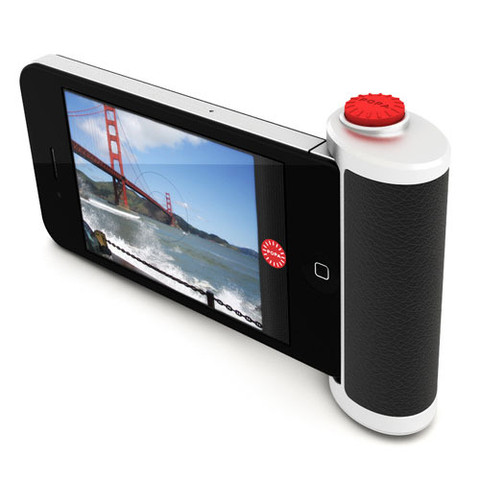
POPA by Beep Industries. I’m really liking this, especially considering the tripod attachment. Hoping it’s not 100% tied to their camera app though, and finding £49.99 to be a bit steep. Cool idea nonetheless.
Found via Noël‘s Exquisite Studio.
POPA by Beep Industries. I’m really liking this, especially considering the tripod attachment. Hoping it’s not 100% tied to their camera app though, and finding £49.99 to be a bit steep. Cool idea nonetheless.
Found via Noël‘s Exquisite Studio.
I travel to the U.S. all the time. I spent more than five weeks there in the last year. And when I do so, I need to remain connected, just like home (and everybody else around me).
Since late 2009, I was using a prepaid Verizon Wireless 3G USB stick. I wasn’t ecstatic about it, but I didn’t hate it and it saved my bacon quite a few times. I was usually going with the $30 plan, which gave me 500MB of bandwidth valid for a week. Quite expensive, but hey, I’m a tourist, I’m used to getting ripped off by carriers.
Being on vacation in Vermont for a week, I headed off to the local Best Buy to get a prepaid refill card (their web-based system won’t let you enter a country for your credit card, so there’s no other way). Once there, they only had $50 cards. Again, not that big of a deal. That was supposed to get me a gigabyte for a month, which I’d share with my wife and kids by sharing the connection on my Mac.
Only this time, I thought about verifying what those $50 would get me for some reason. After inspecting the packaging of one of the said 3G USB sticks (only place the staff and I could find the rates), it was revealed that $50 would now only get me 500MB… 250MB for $30. It seems Verizon has doubled the price of their prepaid mobile broadband offering! Prices which, by the way, are in contradiction with the ones currently advertised on their site (still more expensive than before).
Hmmm, I don’t think sooooooo.
So I just bit my tongue and upgraded to:
So far so good.
Of course, if carriers weren’t such morons, they’d just let me happily pay them to use Personal HotSpot off of my factory unlocked iPhone 4 and skip the Mifi card (built in to all/my account in Canada)…. But who am I kidding?
PS: I paid ~$30 for a month of prepaid 3G in Mexico, at similar speed, and that got me 3GB of bandwidth for my month there. I guess overblown data prices really are a 1st World problem.
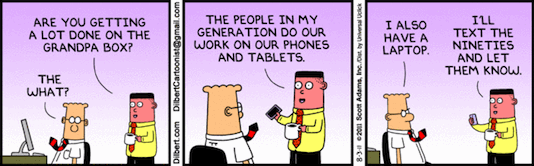 See Dilbert comic strip for 08/03/2011. Found via Andy.
Especially valid in my household today since my sweetie just got herself an iPad 2 despite rocking my previous MacBook Pro. I wouldn’t quite qualify it as a work machine for her, but being a flight attendant, she’ll likely end up doing most of her work-related online tasks on it, plus have a lighter/smaller device to carry around in her luggage while on the go.
I, for one, have no desire for a tablet at the moment. I’m in heaven with my MacBook Air. Only thing that would make it better is built-in 3G. Then again, given how carriers go, it’d likely mean having to pay for two data accounts. I’m perfectly fine with using Personal HotSpot for that, through my iPhone instead. 🙂
More of my temporary desks while working from the Sandos Playacar Hotel this week. If you look closely to the screen in the fourth photo, you can even catch a glimpse of Matt with his Santa hat on. 🙂
I know, I know… I do feel a bit mean and guilty to be posting this while so many of my friends are stuck in the cold and snow, but I couldn’t help myself… :p
As you probably know, my family and I are in Mexico for a few weeks. Because we’re here for close to a month, I’m working full-time for part of our trip while my wife and kids enjoy the goodness that is the all-inclusive Sandos Playacar (we’ll be moving in a villa for the last 2 weeks on the 24th). This lead me to acquire a TelCel Amigo 3G USB stick (comes with 3GB of monthly bandwidth).
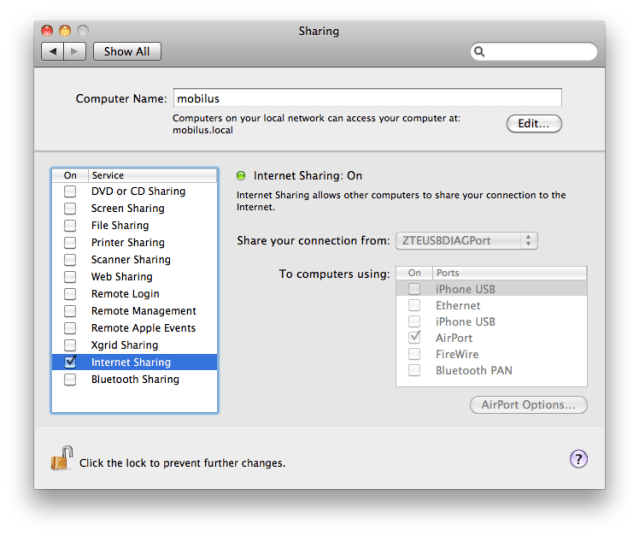
Since this is the only constant internet connection we’ll have throughout our stay, I wanted to be able to share the connection so that I can also connect via wifi for our iPhones (unlocked, also set with simple pay-as-you-go local SIMs, but no data) and my son’s netbook.
If you happen to be on OSX, doing so is absolutely dead-easy.
Tada! You should be all set and now be able to see your mac-as-an-access-point from any wifi-compatible devices. Enjoy! 🙂
Update: Had forgotten to attach the screenshot I mentioned. See below.
[youtube=http://www.youtube.com/watch?v=OhhPi7i32Uo&w=640&h=360]
I’ll admit to have been jealous of my good friend Xopher‘s Nexus One phone and its nifty Android-based, augmented reality Google Sky Map. But I knew I’d find a similar one for the iPhone.
Lo and behold, while in Seaside, a friend showed me Star Walk running on his iPad.
One thing the video doesn’t showcase is that the application makes use of the built-in compass, GPS and gyroscope. This lets you simply point your device anywhere and get a picture-perfect representation of what astronomical objects are in your field of vision as well as get all the details you could want about them.
At $2.99 for such a complete app, I think it’s a very good deal and entirely worth the expense.
Copernicus would be stoked. 🙂

We, at Automattic, have talked a lot about the challenges telecommuters can face when it comes to health, sanity and sedentism while at our annual meetup. Working from home has a lot of advantages, but it’s sometimes difficult to make a clear transition between work and personal life when it comes to schedule, habits and so on.
Here is what I’ll be experimenting with this week: working from the comfort of my home office in the morning, then take advantage of my lunch break to relocate for the afternoon.
High-speed iPhone/3G tethering, full-featured laptops and long-lasting batteries make these kind of things easily achievable nowadays, without compromising on performance nor productivity. Since I am lucky enough to be provided with all of the tools and flexibility I could potentially need to do so, not taking advantage of them would simply be silly.
The expected work and lifestyle improvements I’m aiming for are:
So here’s to committing to and iterating towards a better lifestyle, and thanks Automattic for not only affording me everything I need to do so but for proactively encouraging the entire workforce to find the right work/life balance.
Now, if only those darn bees would stop buzzing around my head… Working outdoors is a risky business, I want danger pay! 😉
Asides:
Here are some quick and dirty panoramic views (QTVR + frames) of the Taz, Montreal’s newest skatepark. Embed VR scenes from the pictures can be found below the gallery.
Construction happened during the Winter, so the even larger outdoors park (94,000 sq/ft) is not built yet. With 83,000 sq/ft indoors, I think we can wait another couple of month. 😉
Sorry for the abysmal quality, but I had more important things on the mind: riding, riding aaaaand, riding! 🙂 Don’t worry, tons of pictures will surface online this week for sure.
Well, it had to happen sometime. Eli White (@EliW) was kind enough [aka: I’ll get ya back! ;)] to tag me in his own version of the Seven Things meme going ’round these days.
Meh, why not? So, I now have to detail seven things about me – some random, some weird – then find seven soul to harass with my new found mischievous streak.
Here we go:
Now, for my preys, aiming for fresh ones:
And to conclude, the complete rules: