Blog

  • Google/Dell Hardware Recall Nightmare…

    I’m usually not one to blog about things closely related to work, but I’ve got to get this one off my chest…

    Being the web systems architect for one of North-America’s best universities, enterprise search is one of the biggest challenges my team and I are being faced with. So a couple of month ago, I made the call to try and replace the heavily customized ht://Dig based architecture we’ve had in place for many years with one of Google’s Search Appliances: a GB-1001, to start with.

    Being, like so many others, a big fan of most of Google’s offerings, and being often confronted with the ongoing Google Mania when it comes to search (Why don’t you do it like Google? Google does it this way. etc), I thought this was pretty much a no-brainer. I, of course, did have my concerns about the solution not being open source, even though it itself relies on it so, but I figured something made and backed by the oh so great Google could only be a safe bet. Right?

    So we ordered one, received it, and as you can expect, we were pretty excited to start hacking at it to implement the engine in our web search strategy.

    And that’s when the madness started…

    Dear Google Customer,

    This is a notice to specific appliance customers regarding a configuration error that is present on a very small set of recently manufactured GB-1001 Google Search Appliances (GSA).

    Since you are receiving this notice, the GSA with the serial number ([serial removed]) that was recently shipped to you has been identified as one of the affected appliances. These affected appliances may either display disk errors at boot time resulting in a non-functional appliance or boot without errors and appear to be functioning properly but then be at risk for having these errors at a later time.

    Google will ship within days a replacement GSA to you along with a return label for the affected appliance. Please be sure to replace the affected appliance as soon as possible to eliminate your risk of incurring any production issues.

    I’ll spare you the rest of the email…

    Not really what I’d expect after shelling out around US $20k, but this did not entirely come as a surprise to me, since that issue showed up in some of the research I had conducted before we received the appliance. And you know what? Stuff happens, and no one is ever shielded from a manufacturing defect.

    So I chose to give them the benefit of the doubt, and just waited for our new appliance to arrive. I even signed up for a Google enterprise search seminar passing by Montreal, mostly to network with other GSA owners. Funnily enough, there was no mention of this problem as they were pitching their products to large IT companies. I didn’t either. Why would I? We just happened to be among the few unlucky customers, among hordes of gleeful ones, that’s all. Remember? Just a very small set of the machines were affected, after all.

    So we got a new one between 1 and 2 weeks after being told it was on its way. The shipping time frame really had nothing to do with Google or Dell (hardware provider for the GSAs), but was simply because the box was held up at customs, like the first one had been. You’d think express air shipping would take this kind of things in consideration, but I guess not.

    Because the return label that customer service had mentioned was actually nowhere to be found in the new box (really), we contacted Google Enterprise to enquire on how to proceed from there, to get the defective server back to them.

    And lo and behold, this is what we got back from the customer relations department:

    The appliance should have shipped with a return label. However, I will contact someone within our organization to send one to you.

    However, we have just discovered that the replacement GSA that was shipped with the following serial number ([serial removed]) is still affected by the same issue and will need to be replaced. We will ship another GSA to you along with a return label for the affected appliance. Please be sure to replace the affected appliance as soon as possible to eliminate your risk of incurring any production issues. We have included a prepaid return label for you to use in returning the affected appliance. Please use the return label and the original shipping container to send the faulty appliance back to Google. Your replacement appliance has been shipped to the following address: [address removed]

    If you have already put the appliance into production we recommend that you backup the configurations for import into the replacement appliance. We also recommend waiting to deploy your appliance to production until any affected appliances have been replaced. We deeply regret any inconveniences this may cause.

    Best regards,

    Google Enterprise Support

    Fantastic, isn’t it?!? Now that is enterprise service! Right? Right…

    But, I thought only a very small set of the GSAs were affected?!?

    Is that what we are to expect throughout our two year contract with them? Because if it’s gonna be this way, I’m not sure I’m willing to bring any of it online anymore. Especially when my name is going to be attached to it in the eyes of the entire university… And that, when I was already eying the GSA clusters, considering the vast number and types of documents we have the potential to index.

    Good thing none of it was in production yet.

    Maybe writing our custom search solution wasn’t so much trouble after all. One thing is for sure, it has served us well during the past 5 to 6 years or so, and despite certain scalability and character set issues, it sure has been a lot more reliable than the GSA’s been so far.

    I’m just stunned by it all, really.

    PS: Why does it feel so strange to post this on Blogger, while using Analytics and AdSense?

    Update: 2006-12-04:

    I have now been assured by Google Canada that the new appliance has been verified not to have the same issue.

    I’ll wait until it’s online before I celebrate this time though.

    Update: 2006-12-05:

    I have to give credit where credit is due, and say that Google Canada has been nothing but helpful since we got in touch on Monday. It’s giving me back my confidence in the level of service I can expect.

    Dare I say I’m getting excited to see the GSA arriving again? Yeah, okay. 🙂

    Update: 2006-12-07:

    The new GSA is now on the floor of my office and will be going to the server room tomorrow.

  • Half-Pipe Skateboarding Competition, Part 1 of 4

    Well, since I’m obviously going a bit video crazy these days, I’m gonna go all the way, right? 😉 This is a fan video shot at the Slam City Jam 2002 in Vancouver, BC, Canada.

    Audio: Zero G, licensed from ibaudio.com.

    I shot the video when I brought my oldest son to his first skateboarding event, at age 2.

  • Praise Be Parallels Desktop's Performance

    I mean, what else can I say? If you watch the attached video, you’ll see what I mean.

    • Mac OS X 10.4.8, Parallels Desktop
    • Windows XP, Internet Explorer 7
    • Fedora Core 6, Firefox 2
    • Ubuntu 6.10 Desktop, Firefox 2

    All running on my usual 2GHz Core Duo MacBook with 2 GB RAM (512MB/VM).

    Performance is awesome. The video is in real time and the only reason the VMs were set to 800×600 was to try and keep the screencast relatively crisp when converted to a small FLV.

    Tip: It’s in the docs and all, but it took me a while to remember how to launch multiple windows in Parallels Desktop, since it loads VMs in the same window when opening them: File menu » New Window

  • Screencast: Fedora Core 6 Install in VMWare Workstation

    This screencast illustrates installing Fedora Core 6 Linux as a virtual machine in VMWare Workstation. It is based on the series of screenshots offered for download, along with the resulting virtual machine, in my previous post.

    Related posts:

    Enjoy!

  • Screencast: Fedora Core 6 Install in Parallels Desktop

    This screencast illustrates installing Fedora Core 6 Linux as a virtual machine in Parallels Desktop for Mac. It is based on the series of screenshots offered for download, along with the resulting virtual machine, in my previous post.

    Related posts:

    Enjoy!

  • Linux Install Screencasts Coming Soon

    I’ve been toying around in iMovie, experimenting with it as a screencast tool. A bit away from what I usually do with it, but it’s not bad so far. Fun and easy to work with, as usual.

    Nothing fantastic, but I have a few Linux install movies coming up in the next few days. I’m also going to try uploading them to MetaCafe. We’ll see how it goes.

    Trying to fit this between my 7 year-old son’s hockey games (so far undefeated!).

  • Help Requesting Flash for Linux on PowerPC

    Kai Staats is asking for the community’s support in requesting for Adobe to port Flash 9 for Linux to the Power architecture (YDL, really). He also appropriately suggests for people to submit the requests with consistent[-ish] data, so the numbers work in the movement’s favour.

    Soon to be fully opened sourced, Sun’s Java is sure to quickly become available for this platform, therefore making the Flash player and browser plugin one of the next must-have components remaining to be ported. We will need Adobe to provide us with this port though, since the Flash Player source is not Free or available.

    I haven’t yet, but in the meantime, one could also try to use Gnash, a GNU Flash movie player.

    Update: I tried Gnash 0.7.2 (in FC6 Extras) on my iBook G3 tonight. It’s promising, but most definitely is a work in progress to say the least (admittedly so: alpha 2). Most simple animations work fine enough, but more advance Flash movies are still out of reach. It also does not seem to support the now iconic Flash Video format (flv), now made ubiquitous on the Web through such high profile sites as YouTube, Google Video, MetaCafe, and countless others.

  • Compiling and Using ClusterSSH on Mac OS X

    The challenge

    We use a cluster of GNU/Linux-powered nodes behind a Cisco load balancer to serve some of our web sites. These nodes being quasi-identical (most config, filesystems, etc), we often need to apply the very same changes, via ssh, to each of them at once in our daily maintenance tasks.

    ClusterSSH to the Rescue

    ClusterSSH is a small Perl/TK utility that controls a number of xterm windows via a single graphical console window to allow commands to be interactively run on multiple servers over an ssh connection. This means that you type your shell commands once, and they simultaneously run on all of the servers ClusterSSH is connected to.


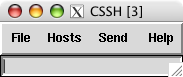
    CusterSSH in action on Mac OS X (Tiger, MacBook)

    A perfect fit for our needs, but not quite limited to our higher end environment. Using ClusterSSH, you can control x number of computers via ssh, whether they are exact replicas of one another (cluster) or not. This can be especially useful in a computer lab environment, or with any large number of similar systems that you want to edit from the command line.

    EG: You can easily run softwareupdate on OS X or yum/apt on Linux, or even download a file from a central server, on all the computers in your office at once and without the need for more elaborate or expensive graphical solutions.

    For the record, there is another project on SourceForge that shares the same purpose and executable name (cssh), but that project has not seen a release since 2004, unlike ClusterSSH, which seems to be kept rather well up-to-date by its developer(s).

    But wait, we’re on OS X

    ClusterSSH is an X11-based application, which Apple has been providing a port for OS X for years. But if you are on an Intel-based Mac, you might have been wondering where to find the said port for your architecture, since it is not an install option on the DVD provided with your new machine. Well, it is there, but the installer package is in fact in a directory hidden from the Finder.

    To install Apple’s X11 built for your MacIntel, simply do the following:

    • mount the DVD that came with your Mac
    • open a terminal window
    • type open /Volumes/[OSX_DVD]/System/Installation/Packages/X11User.pkg where [OSX_DVD] is the volume name of the install DVD
    • go through the newly launched installer
    • tada!

    Maybe Apple thought their Universal Binary version was only half-baked (…), at least until the latest update they released on November 13, which was itself Intel-ready. Should you choose not to install the latter, you will be prompted to update X11 the next time you run Software Update.

    The Perl install that comes bundled with OS X lacks one of the modules that ClusterSSH relies on to provide a small GUI window for you to type your distributed commands in: Tk. Depending on when you read this (2006-11-21), you might want to run a CPAN search for a newer version than the one I link to.

    Installing Tk is quite easy if you are familiar with the terminal, and requires for you to have installed the Developer Tools that came bundled with OS X.

    • get the latest Perl/Tk module from CPAN
    • decompress the downloaded archive
    • important: open X11 (Applications » Utilities), and use its terminal for the next steps
    • cd to the Tk folder
    • perl Makefile.PL
    • make
    • make test
    • sudo make install
    • and you should be done

    The make test step will procedurally try the miscellaneous X interface components that Perl/Tk provides, hence the need to run it in X11. All went fine in my context, but you can find more information on Steve Lidie‘s site at Lehigh University if needed: Perl/Tk and Mac OS X.

    On to compiling ClusterSSH

    Now that we have met ClusterSSH prerequisites (X11::Protocol is bundled with OS X), we can move on and compile the software for OSX.

    • get the latest version of the source from the official site.
    • decompress the downloaded archive
    • in a terminal window, cd to the clusterssh-* folder
    • ./configure
    • make
    • sudo make install

    On many UNIX systems, you might now be able use the cssh command, but in OS X, you will probably need to make sure that your environment knows to look for software in /usr/local/bin by default, particularly in the terminal. To do so:

    • go back to the terminal
    • type env
    • see if /usr/local/bin is part of the list making up the PATH variable
    • if not type export PATH=$PATH:/usr/local/bin then exit.

    And that is essentially it…

    Using ClusterSSH

    Now that everything is installed, keep in mind that the purpose of this software is to run the same actions on a number of connected computers, which obviously has tremendous advantages, but also countless dangers.

    Read every command before running them, and make sure you did not accidentally or temporarily shifted the window focus to one of the nodes, therefore processing your request one one of the hosts only.

    Before you start using cssh, make sure to have a user with the same username and password combination on all of the targeted hosts, unless you opted to pass some of these parameters in the individual connection strings.

    Then, in an X11 terminal window, use the cssh command as illustrated below:

    cssh user@your.host.1 user@your.host.2 user@your.host.3 [...]

    When all of the windows are launched, be sure to
    put t
    he focus on the small window (see right) and type your commands. In most cases, this will mean starting by typing your password to the computers your are connecting to. And then, you’re off to the races.

    You can take some steps to make your time with ClusterSSH easier, such as using ssh keys to forgo having to type a password altogether (think about security though). You can also write a small shell script already containing the full list of nodes you are most often connecting to.

    I have successfully tested ClusterSSH on Mac OS X 10.4.x (Tiger) on:

    For more information you can now use man /usr/local/man/man1/cssh.1 in the terminal to see the full cssh documentation, or see the online FAQ.

    But please, do keep reminding yourself that the old “rm -rf ~/*” cliché is multiplied by the number of hosts you are connected to. 😉

    Enjoy.

    Update 1: a comment attached to this post led me to a similar tool that has its own advantages, and is well worth mentioning here: dsh.

    Update 2: for those of us also running GNU/Linux, ClusterSSH is also available as a pre-compiled Debian package and Fedora RPM.

  • Mission STS-118 Canadian Patch Design Contest

    McGill University announced a pretty unique contest for the student body today: designing a commemorative patch that will be worn by the Canadian astronaut on Mission STS-118 to the International Space Station in June of 2007.

    McGill and the Canadian Space Agency are proud to announce the launch of the Mission STS-118 Canadian Patch Design Contest. The winner will have the unique experience of seeing their design chosen for Dr Williams‘ uniform, AND will be invited to attend the launch of mission STS-118 in the Mission Control Room at the Canadian Space Agency.

  • Having a bad tech weekend…

    I started on a quest to install Linux PPC on my older iBook G3 yesterday. I wanted to try and breathe some productivity back into it, as Apple has been phasing out G3 support over the last few years. But I’m not having too much luck so far…

    I first installed Fedora Core 6 PPC, which all seemed fine until I tried to put the laptop to sleep. The whole thing crashed on wake up, and corrupted GNOME so bad, for all users, that I was unable to recover from it, even after rebooting…

    Fedora Core 6 error when waking the G3 iBook from sleep
    Not being in the mood to troubleshoot the thing, I decided to give a try to Ubuntu Desktop 6.10 PPC instead. Again, the install went fine, and sleep was working this time, but then I was quickly remembered why I stuck to a server environment when running Linux PPC in the past: no flash, no easy way to play video (vlc, mplayer, xine, ffmpeg, etc all crashed), no java, no wpa wireless security protocol setup by default, etc.

    Aaaaaaaargh! I’ve had enough of that for one weekend… And it’s not for lack of trying, as I’ve probably spent more than 12 hours giving it all a fair try. But not being the type to just give up completely, I’m getting the FC6 PPC DVD at work as we speak, and I’ll try again next week. Knowing Linux, there are probably solutions to most of my problems.

    We shall see.