Category: Uncategorized

  • Compiling and Using ClusterSSH on Mac OS X

    The challenge

    We use a cluster of GNU/Linux-powered nodes behind a Cisco load balancer to serve some of our web sites. These nodes being quasi-identical (most config, filesystems, etc), we often need to apply the very same changes, via ssh, to each of them at once in our daily maintenance tasks.

    ClusterSSH to the Rescue

    ClusterSSH is a small Perl/TK utility that controls a number of xterm windows via a single graphical console window to allow commands to be interactively run on multiple servers over an ssh connection. This means that you type your shell commands once, and they simultaneously run on all of the servers ClusterSSH is connected to.


    CusterSSH in action on Mac OS X (Tiger, MacBook)

    A perfect fit for our needs, but not quite limited to our higher end environment. Using ClusterSSH, you can control x number of computers via ssh, whether they are exact replicas of one another (cluster) or not. This can be especially useful in a computer lab environment, or with any large number of similar systems that you want to edit from the command line.

    EG: You can easily run softwareupdate on OS X or yum/apt on Linux, or even download a file from a central server, on all the computers in your office at once and without the need for more elaborate or expensive graphical solutions.

    For the record, there is another project on SourceForge that shares the same purpose and executable name (cssh), but that project has not seen a release since 2004, unlike ClusterSSH, which seems to be kept rather well up-to-date by its developer(s).

    But wait, we’re on OS X

    ClusterSSH is an X11-based application, which Apple has been providing a port for OS X for years. But if you are on an Intel-based Mac, you might have been wondering where to find the said port for your architecture, since it is not an install option on the DVD provided with your new machine. Well, it is there, but the installer package is in fact in a directory hidden from the Finder.

    To install Apple’s X11 built for your MacIntel, simply do the following:

    • mount the DVD that came with your Mac
    • open a terminal window
    • type open /Volumes/[OSX_DVD]/System/Installation/Packages/X11User.pkg where [OSX_DVD] is the volume name of the install DVD
    • go through the newly launched installer
    • tada!

    Maybe Apple thought their Universal Binary version was only half-baked (…), at least until the latest update they released on November 13, which was itself Intel-ready. Should you choose not to install the latter, you will be prompted to update X11 the next time you run Software Update.

    The Perl install that comes bundled with OS X lacks one of the modules that ClusterSSH relies on to provide a small GUI window for you to type your distributed commands in: Tk. Depending on when you read this (2006-11-21), you might want to run a CPAN search for a newer version than the one I link to.

    Installing Tk is quite easy if you are familiar with the terminal, and requires for you to have installed the Developer Tools that came bundled with OS X.

    • get the latest Perl/Tk module from CPAN
    • decompress the downloaded archive
    • important: open X11 (Applications » Utilities), and use its terminal for the next steps
    • cd to the Tk folder
    • perl Makefile.PL
    • make
    • make test
    • sudo make install
    • and you should be done

    The make test step will procedurally try the miscellaneous X interface components that Perl/Tk provides, hence the need to run it in X11. All went fine in my context, but you can find more information on Steve Lidie‘s site at Lehigh University if needed: Perl/Tk and Mac OS X.

    On to compiling ClusterSSH

    Now that we have met ClusterSSH prerequisites (X11::Protocol is bundled with OS X), we can move on and compile the software for OSX.

    • get the latest version of the source from the official site.
    • decompress the downloaded archive
    • in a terminal window, cd to the clusterssh-* folder
    • ./configure
    • make
    • sudo make install

    On many UNIX systems, you might now be able use the cssh command, but in OS X, you will probably need to make sure that your environment knows to look for software in /usr/local/bin by default, particularly in the terminal. To do so:

    • go back to the terminal
    • type env
    • see if /usr/local/bin is part of the list making up the PATH variable
    • if not type export PATH=$PATH:/usr/local/bin then exit.

    And that is essentially it…

    Using ClusterSSH

    Now that everything is installed, keep in mind that the purpose of this software is to run the same actions on a number of connected computers, which obviously has tremendous advantages, but also countless dangers.

    Read every command before running them, and make sure you did not accidentally or temporarily shifted the window focus to one of the nodes, therefore processing your request one one of the hosts only.

    Before you start using cssh, make sure to have a user with the same username and password combination on all of the targeted hosts, unless you opted to pass some of these parameters in the individual connection strings.

    Then, in an X11 terminal window, use the cssh command as illustrated below:

    cssh user@your.host.1 user@your.host.2 user@your.host.3 [...]
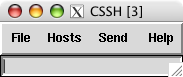
    When all of the windows are launched, be sure to
    put t
    he focus on the small window (see right) and type your commands. In most cases, this will mean starting by typing your password to the computers your are connecting to. And then, you’re off to the races.

    You can take some steps to make your time with ClusterSSH easier, such as using ssh keys to forgo having to type a password altogether (think about security though). You can also write a small shell script already containing the full list of nodes you are most often connecting to.

    I have successfully tested ClusterSSH on Mac OS X 10.4.x (Tiger) on:

    For more information you can now use man /usr/local/man/man1/cssh.1 in the terminal to see the full cssh documentation, or see the online FAQ.

    But please, do keep reminding yourself that the old “rm -rf ~/*” cliché is multiplied by the number of hosts you are connected to. 😉

    Enjoy.

    Update 1: a comment attached to this post led me to a similar tool that has its own advantages, and is well worth mentioning here: dsh.

    Update 2: for those of us also running GNU/Linux, ClusterSSH is also available as a pre-compiled Debian package and Fedora RPM.

  • Mission STS-118 Canadian Patch Design Contest

    McGill University announced a pretty unique contest for the student body today: designing a commemorative patch that will be worn by the Canadian astronaut on Mission STS-118 to the International Space Station in June of 2007.

    McGill and the Canadian Space Agency are proud to announce the launch of the Mission STS-118 Canadian Patch Design Contest. The winner will have the unique experience of seeing their design chosen for Dr Williams‘ uniform, AND will be invited to attend the launch of mission STS-118 in the Mission Control Room at the Canadian Space Agency.

  • Having a bad tech weekend…

    I started on a quest to install Linux PPC on my older iBook G3 yesterday. I wanted to try and breathe some productivity back into it, as Apple has been phasing out G3 support over the last few years. But I’m not having too much luck so far…

    I first installed Fedora Core 6 PPC, which all seemed fine until I tried to put the laptop to sleep. The whole thing crashed on wake up, and corrupted GNOME so bad, for all users, that I was unable to recover from it, even after rebooting…

    Fedora Core 6 error when waking the G3 iBook from sleep
    Not being in the mood to troubleshoot the thing, I decided to give a try to Ubuntu Desktop 6.10 PPC instead. Again, the install went fine, and sleep was working this time, but then I was quickly remembered why I stuck to a server environment when running Linux PPC in the past: no flash, no easy way to play video (vlc, mplayer, xine, ffmpeg, etc all crashed), no java, no wpa wireless security protocol setup by default, etc.

    Aaaaaaaargh! I’ve had enough of that for one weekend… And it’s not for lack of trying, as I’ve probably spent more than 12 hours giving it all a fair try. But not being the type to just give up completely, I’m getting the FC6 PPC DVD at work as we speak, and I’ll try again next week. Knowing Linux, there are probably solutions to most of my problems.

    We shall see.

  • Sony OtherOS Installer for Sony PlayStation 3 Released


    Last saturday, I posted about Terra Soft releasing Yellow Dog Linux 5 for the PS3 on November 27th. And earlier this week, the Fedora developers tried to one-up them by releasing an add-on disc for FC5 PPC (which YDL is based on) to install the original distribution on one’s shiny new console.

    Today, the very much anticipated Sony OtherOS Installer was also made available for download, unleashing the final key to enabling anyone to easily turn the powerful game console into a full blown computer.

    It is advised to use the FC5 PPC DVD, rather than CD set, to proceed with this installation:

    For more details, the Quick Journal team has a couple of nice articles on how to boot and install GNU/Linux on the PlayStation 3.

    I would still imagine, though, that Terra Soft will probably remain the leader in Linux for the Power Architecture, all the more in the enterprise market, given the type of resources they have to support their distribution: dedicated team, first Cell-based supercomputer, IBM and Sony backing, etc.

    But for many, you can’t be early and free! 🙂

    Update: Someone has now posted a video of Fedora Core 5 running on a PS3 on YoutTube.

  • Our secret spot no more…

    My family, Vieux-Boucau, Dec. 2004

    I was browsing through The Channel Channel‘s 10 seconds video previews in the open source Democracy Internet TV Platform last night, when I stumbled on a podcast from the French region I am originally from: Les Landes.

    I don’t think it could have hit any closer to home for me, since the subject matter is surfing (surfboard). It features the beaches I spent my childhood on, learning to ride those very waves with any board I could lay my hands on (surf, bodyboard, sometime without), before I left France when I was twelve. From Arcachon to Hendaye , and everything in between.

    The video embedded below, shot by Julien Salomon, features pro and local surfers at La Gravière (gravel quarry) between Hossegor and Vieux-Boucau. This amazing beach used to be The secret spot only locals knew when I was a kid (80’s). Needless to say, such is not the case any longer, despite the fact that it takes 15-20 minutes on a sand trail through the forest to get to this little piece of heaven.

    Anecdote: The wave seen in my blog‘s header (logo background) was actually shot in Capbreton, which in only separated from Hossegor by a canal and marina. The lighthouses seen in the background of the last few frames of the video clip stand at the end of the said canal, guiding ships into port.

    And if more than 250 km (155 miles) of white sand beaches and Europe’s largest pine forests are not enough to get your mojo going, the Pyrénées are only an hour drive away, for World class hiking trails and ski/snowboard resorts.

    Exactly the kind of reminder I needed to prepare myself for the loooooong Montreal winter… NOT! 😉

  • Stay Tuned!

    Is YouTube getting ready to launch something? This screenshot was taken around 12AM EST, the day after Google completed their acquisition of the video sharing star.

    Can’t wait to see what’s up in the morning. 🙂

  • Happy belated birthday WWW!

    The Web is 16

    I was reminded this morning that what has been my bread and butter for the last 12 years turned 16 yesterday.

    Initial WorldWideWeb program development continues on the NeXT (TBL) . This was a “what you see is what you get” (wysiwyg) browser/editor with direct inline creation of links. The first web server was nxoc01.cern.ch, later called info.cern.ch, and the first web page http://nxoc01.cern.ch/hypertext/WWW/TheProject.html Unfortunately CERN no longer supports the historical site. Note from this era too, the least recently modified web page we know of, last changed Tue, 13 Nov 1990 15:17:00 GMT (though the URI changed.)

    A dot on the historical timeline, the Web has to be right up there among the quickest and most influential revolutions the World has so far witnessed.

    And what a feisty teenager it can be… Here’s to another 16 years! 🙂

  • Until we meet again, Justice

    I spent the last month stressing out about having been summoned for jury duty in a criminal case, here in Montreal. I was truly torn between wanting to do my duty as a proud citizen of a country lucky to have such institutions, and what it could translate into for my family, employer and self over what can be a draining experience, lasting months to complete in some cases…

    So I went this morning, going from shuffling ideas in the back of my mind on how I could get out of it, to almost be excited to be a part of an experience that might not present itself again in my lifetime.

    After being briefed on the details of the case, which I cannot elaborate on for legal and decency reasons, we were offered the opportunity to ask the judge for an exemption. I would say almost half the room (we were about 100) rushed to do so, only for the large majority to be told they were not entitled to one. I decided not to ask for one myself, concluding that the least I could do was to let the process take its course, and leave it to the court to decide if this was meant to be.

    Sure enough, I was drawn to be in the first twenty people to be evaluated by the prosecution and defense. Both parties are allowed to refuse up to twenty jurors without any further explanation. They can refuse more if needed, but past 20, they have to start justifying their decisions.

    I was eighteenth in the first batch of twenty. When it came time for me to pass in front of the judge, prosecution and defense, only 4 jurors had been retained.

    I was asked to state my name and occupation. The prosecution accepted me right away, but after a few seconds of what looked like intense deliberation, the two defense lawyers deemed that I did not fit their criteria for this case.

    I have to say that I was relieved the decision had been made for me. This is because the next step was to swear under oath that, among other things, I would only make a decision based on the proofs presented to us during the case, and on the proofs only. I do not think I could have sincerely sworn to this, because I don’t believe that a legally untrained person could swear to leave their personal beliefs and judgments behind to act as some kind of legal robot, particularly in a murder case. I am not arguing against the system, but I could not pretend to be prone to this kind of detachment myself. And if I wasn’t going to lie to weasel myself out of the responsibility, like so many others tried to do, I certainly was not ready to do so to falsely get into it either, regardless of what the consequences might be.

    So if I understood properly, it now means I cannot be called for jury duty for another five years. I’m almost curious to see if and how life might change my opinion with a few more years under my belt, should I be randomly drawn from the electors list again.

  • New custom site template launched

    New v. old template

    Those who visited these pages before will notice that I have now implemented a custom Blogger template. It is still [very] loosely based on TicTac, the built-in one I was using until today. Hope you like it.

  • Sony Barking Up the Right Tree for their PS3 Linux

    Yellow Dog Linux for Playstation 3, featuring E17

    Linux on the Playstation 3 (PS3) has been covered before, but the inside story is that Sony Computer Entertainment Inc. (SCEI) has entered in an agreement with Terra Soft Solutions (TSS) to bring Yellow Dog Linux 5 (YDL) to their next generation console, which was actually released today in Japan.

    Under basic agreement with SCEI, Terra Soft was granted a unique opportunity to develop and bring to market a complete Linux OS for PLAYSTATION 3. In the development of Yellow Dog Linux v5.0, Terra Soft integrated and enhanced code from Barcelona Supercomputing Center, SCEI , and Fedora in order to offer the following: kernel 2.6.16, gcc 4.1.1 and glibc 2.4, Cell SDK 1.1, OpenOffice.org 2.0.2, FireFox 1.5.0 and Thunderbird 1.5.0, Nautilus 2.14 … and a suite of Personal Accessories, Development Tools; Sound & Video, Internet, and Networking applications.

    This is indeed a fantastic opportunity for the dynamic team behind YDL, especially now that Apple has completed its transition to the Intel platform, leaving behind the Power architecture. But what could have spelled the company’s dismay is now instead referred to by Kai Staats, CEO of Terra Soft, as a potential blessing in disguise, thanks to the exciting Cell architecture.

    In fact, YDL 5 will initially be released for the PS3 on its North American launch date of November 17th, with Apple and other PowerPC based systems supported later in the year. The product will be available to the YDL.net Enhanced members first (Nov.27), later on DVD (Dec. 11), and for download as a holiday treat (Dec. 25).

    As a long time YDL user both at work and at home, I am ecstatic to know that TSS has found an exciting new revenue model for their solid offering, with a potentially quite large user base if the PS3 proves to be a success, despite heavy competition from the Wii and Xbox.

    PS3/YDL/E17

    Another big winner in this deal is the Enlightenment Project, since their E17 (DR17) desktop manager has been chosen to bring what promises to be a beautiful GUI to the YDL/PS3 combination.

    When it came out in 1997, Enlightenment blew a strong blow to many other desktop environments, UNIX based and beyond, effectively delivering features such as window transparency to even modest hardware.

    Having unfortunately suffered from project management issues in the past, Enlightenment lost tremendous ground to GNOME and KDE over the years, and I am glad to see the new development team benefiting from this project.

    From game console to supercomputer

    Provided the Power architecture’s performance in number crunching intensive applications such as modeling and rendering, Terra Soft is also a very strong contender in the scientific and supercomputing markets, thanks to their Y-Bio and Y-HPC products.

    Y-Bio is Terra Soft’s solution for the growing life sciences market. Built upon the RPM Linux standard for package management, Y-Bio offers gene sequence analysis applications –tools which help bioinformatics researchers conduct their work with greater efficiency.

    Y-HPC is Terra Soft’s cluster construction-management suite for Apple G5 (IBM 970) Xserves. Built upon 64-bit Yellow Dog Linux, Y-HPC offers 64-bit enhancements for code development. In use by the Department of Energy, Department of Defense, and University labs nation-wide, Yellow Dog Linux and Y-HPC are a preferred Linux platform for the Power architecture.

    TSS is currently contracted by Sony to build of the world’s first Cell-based supercomputing cluster in their Loveland, Colorado headquarters.

    So, thanks for complicating my life…

    Okay, now that I had narrowed my choices down to either a Mac Mini or Apple’s upcoming iTV for our family room, you’re telling me I have to start over again?

    Between the games, the Blu-ray/DVD/CD, flash memory and hard drive, the USB2 ports and now a powerful desktop OS making it a full fledged workstation, I might actually get a PS3 for my home office.

    Sorry kids, that’s daddy’s toy! 😉